htaccess code for SSL redirection

Please visit our channel & subscribe: https://youtube.com/dhakawebhost

1. Log into cPanel

2. Go to File Manager

3. Go to public_html folder

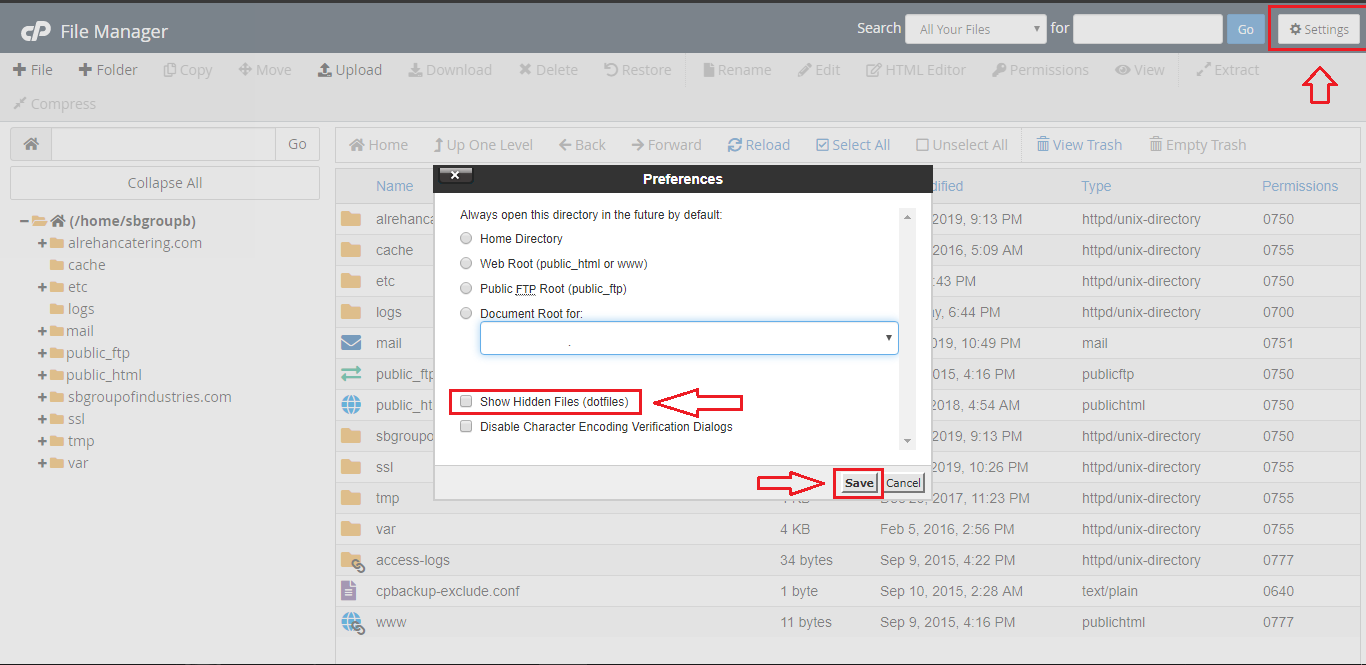
4. Now click on Settings from the right upper site and select "show hidden files" as .htaccess file kept hidden in file manager, click save. See the image
5. Open .htaccess file (right click on mouse and choose edit)

6. Just add these lines given below and click save

RewriteEngine On
RewriteCond %{SERVER_PORT} ^80$
RewriteRule ^(.*)$ https://%{SERVER_NAME}%{REQUEST_URI} [L,R]


  • 0 Uživatelům pomohlo
Byla tato odpověď nápomocná?

Související články

Generate a Certificate Signing Request (CSR) for cPanel

Please visit our channel & subscribe: https://youtube.com/dhakawebhost Follow these...

Generate CSR for Nginx Server

Please visit our channel & subscribe: https://youtube.com/dhakawebhost Login to your server...

Generate CSR for Plesk

Please visit our channel & subscribe: https://youtube.com/dhakawebhost For Plesk 7.5, this...

What is a CSR (Certificate Signing Request)?

Please visit our channel & subscribe: https://youtube.com/dhakawebhost What is a CSR? A CSR...

What is contained in a CSR?

NAMEEXPLANATIONEXAMPLES Common Name The fully qualified domain name (FQDN) of your...