Set global email filters to manage your email accounts


Please visit our channel & subscribe: https://youtube.com/dhakawebhost


Create and manage email filters for your main email account.
 
 
Step 1: Log into your cpanel by providing your username and password.

ModulesGarden

 
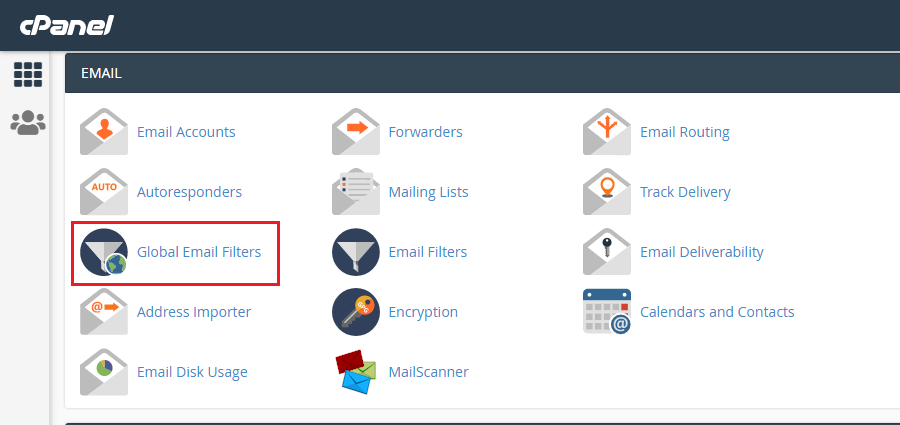
Step 2: Go to Global Email Filters under EMAIL sections.
ModulesGarden

 
Step 3: Click "Create a New Filter"

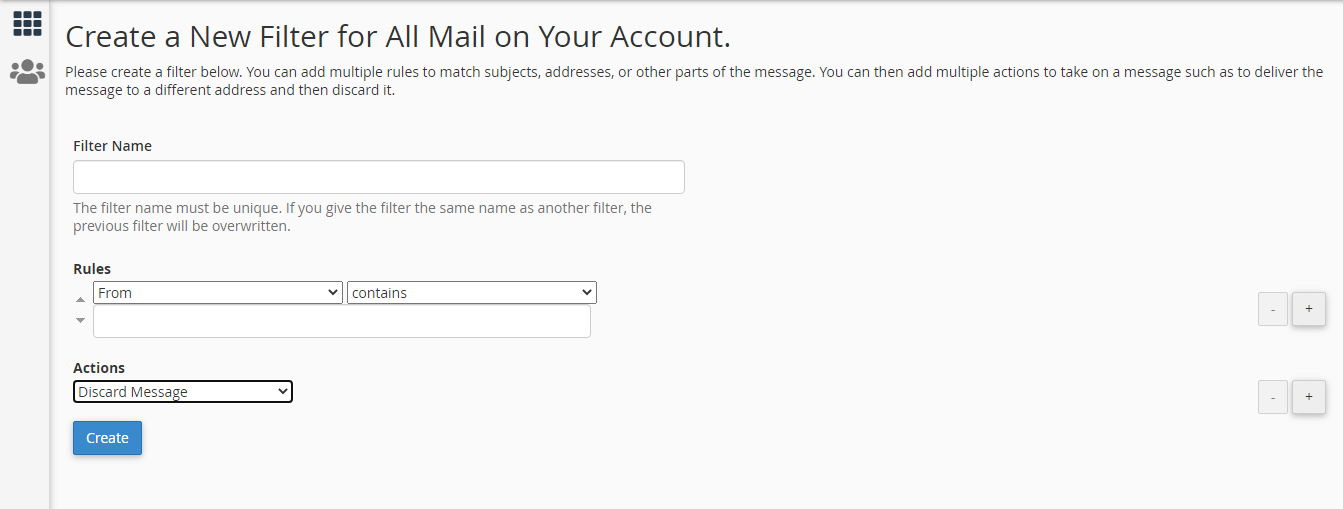
Step 4: Enter Filter Name, Select the rules by which you want to filter email(You can add more rules by cliccking the + sign from the right side of the Rules field). Select Action you want the filtered emails to do.
ModulesGarden

 
Step 5: Click "Create"

  • 0 Корисниците го најдоа ова како корисно
Дали Ви помогна овој одговор?

Понудени резултати

How to edit hosts file?

Please watch this video: https://www.youtube.com/watch?v=CHBwTzeOkDg Why do we need to edit the...

Cron Job Usage & Policy

Please visit our channel & subscribe: https://youtube.com/dhakawebhost What Is a Cron Job?...

CPU Resource Limit

Please visit our channel & subscribe: https://youtube.com/dhakawebhost CPU Resource...

About cPanel Login

Please watch this video:...

How To Creating an Autoresponder in cPanel

Please visit our channel & subscribe: https://youtube.com/dhakawebhost   To configure Email...